Credentials
Description
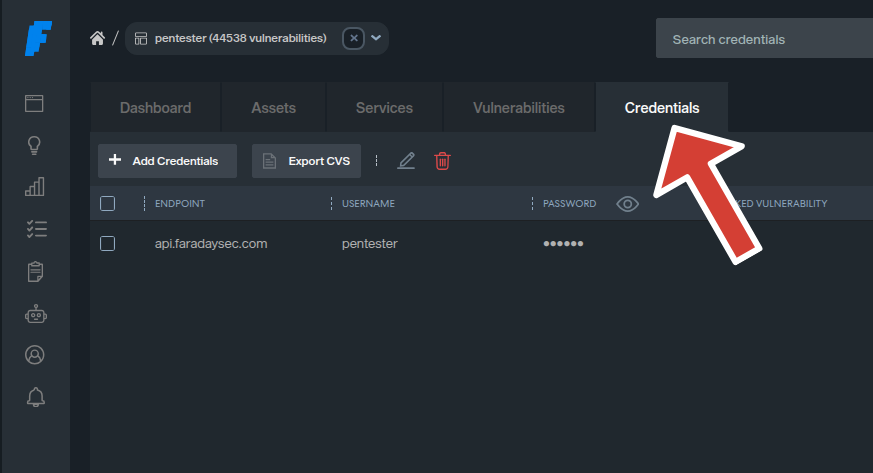
The Credentials Module in Faraday provides a robust system for managing credentials discovered during penetration testing or security assessments. It allows users to import, filter, and export credentials within specific workspaces. This feature is essential for securely handling sensitive authentication data and integrating it with other Faraday modules, such as vulnerabilities.
Features
1. Credential Management
- Perform CRUD (Create, Read, Update, Delete) operations on credentials.
- Store essential fields such as:
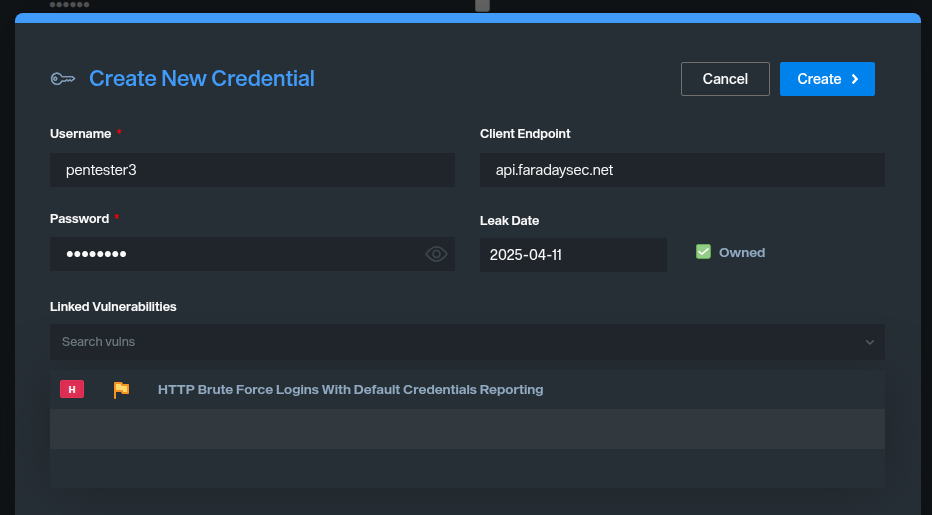
username: The username for the credential.password: The password for the credential.endpoint: The target endpoint associated with the credential.leak_date(optional): The date when the credential was leaked.- Associate credentials with vulnerabilities for better context.
2. CSV Import
- Bulk import credentials from a CSV file.
- Required CSV headers:
usernamepasswordendpoint- Optional CSV header:
leak_date(inYYYY-MM-DDformat).- Automatically validates the format and handles errors during the import process.
- Provides detailed feedback on successfully created and skipped credentials.
3. Filtering and Export
- Advanced filtering capabilities using query parameters.
- Export filtered credentials to a CSV file for offline analysis.
- Supports workspace-specific operations to ensure data isolation.
4. Security
- Role-based access control:
- Only users with
AdministratororPentesterroles can access the module. - Workspace-level isolation ensures credentials are only accessible within their respective workspaces.
API Endpoints
Import Credentials
URL:
POST http://localhost:5985/_api/v3/ws/{workspace}/credential/import_csv
Description:
Imports credentials from a CSV file into the specified workspace.
Request Example:
import requests

files = {'file': open('credentials.csv', 'rb')}
response = requests.post(
    'http://localhost:5985/_api/v3/ws/{workspace}/credential/import_csv',
    files=files
)
print(response.json())
Examples for Filters with the Credentials API
The Credentials API allows filtering credentials based on specific attributes. Below are Python examples demonstrating how to use filters with this API.
Description
Retrieve credentials filtered by a specific username.
Example
import requests

# Define the API endpoint and query parameters
url = "http://localhost:5985/_api/v3/ws/{workspace}/credential/filter"
params = {
    "q": '{"filters":[{"field":"username","operator":"equals","value":"admin"}]}'  # Filter by username
}

# Send the GET request
response = requests.get(url, params=params)

# Print the response
if response.status_code == 200:
    print("Filtered Credentials:")
    print(response.json())
else:
    print(f"Error: {response.status_code} - {response.text}")
Searchable Fields in the Credentials API
Based on the provided code for the Credentials API, the following fields can be searched or filtered:
usernameThe username associated with the credential.passwordThe password associated with the credential.endpointThe target endpoint (e.g., IP address, domain) associated with the credential.leak_dateThe date when the credential was leaked (if applicable).ownedA boolean field indicating whether the credential is owned (trueorfalse).vulnerabilitiesAssociated vulnerabilities linked to the credential.workspace_nameThe name of the workspace where the credential is stored.metadataMetadata fields associated with the credential (e.g., creation date, update date).
These fields can be used in filters to query the API for specific credentials based on the desired criteria.
Error Handling
CSV Import Errors
- Missing required headers in the CSV file.
- Invalid
leak_dateformat. - Database integrity errors (e.g., duplicate credentials).
Filter Errors
- Invalid query parameters.
- Workspace not found.
Example Workflow
Import Credentials
- Upload a CSV file containing credentials to the workspace.
- The system validates the file and imports valid credentials.
Filter Credentials
- Use query parameters to filter credentials based on specific criteria (e.g., username, endpoint).
Export Credentials
- Export the filtered credentials to a CSV file for further analysis.
Conclusion
The Credentials Module is a powerful tool for managing sensitive authentication data during penetration testing. It streamlines the process of importing, filtering, and exporting credentials while ensuring data security and workspace isolation.