GVM/OpenVAS Executor
Category: Network and Vulnerability Scanners
Script: gvm_openvas.py
Integration: python-gvm SDK
Faraday Plugin: OpenvasPlugin
Website: https://www.greenbone.net/
Description
Connects to a Greenbone Vulnerability Management (GVM) / OpenVAS instance via the python-gvm library, creates a scan target and task, executes the scan, waits for completion, exports the XML report, and parses it into Faraday.
This is the modern GVM executor. For legacy OpenVAS installations using the omp CLI, use the OpenVAS Legacy executor.
Prerequisites
- GVM/OpenVAS installed and running (Greenbone Community Edition or Enterprise)
- Python package:
python-gvm - One of: Unix socket access, SSH access, or TLS access to the GVM daemon
Configuration
Environment Variables (Setup)
| Variable | Required | Description |
|---|---|---|
GVM_USER |
Yes | GVM username |
GVM_PASSW |
Yes | GVM password |
HOST |
Yes | GVM host address |
PORT |
Yes | GVM port number |
Execution Arguments
| Parameter | Type | Mandatory | Description |
|---|---|---|---|
SCAN_TARGET |
string | Yes | Target host or IP to scan |
CONNECTION_TYPE |
string | Yes | Connection method: socket, ssh, or tls |
SCAN_ID |
string | No | GVM scan configuration UUID (default: daba56c8-73ec-11df-a475-002264764cea — Full and Fast) |
PORT_LIST_ID |
string | No | Port list UUID (default: 33d0cd82-57c6-11e1-8ed1-406186ea4fc5 — All IANA assigned TCP) |
SOCKET_PATH |
string | No | Unix socket path (default: /var/run/gvmd/gvmd.sock). Required when CONNECTION_TYPE is socket |
SSH_USER |
string | Conditional | SSH username. Required when CONNECTION_TYPE is ssh |
SSH_PASSW |
password | Conditional | SSH password. Required when CONNECTION_TYPE is ssh |
TLS_CERTFILE_PATH |
string | No | TLS client certificate file path |
TLS_CAFILE_PATH |
string | No | TLS CA certificate file path |
TLS_KEYFILE_PATH |
string | No | TLS client key file path |
TLS_PKEY_PASSW |
password | No | TLS private key password |
YAML Configuration Example
executors:
  openvas_scan:
    repo_executor: gvm_openvas.py
    max_size: 65536
    varenvs:
      GVM_USER: admin
      GVM_PASSW: "${GVM_PASSWORD}"
      HOST: gvm.local
      PORT: "9390"
    params:
      SCAN_TARGET:
        mandatory: true
        type: string
        base: string
      CONNECTION_TYPE:
        mandatory: true
        type: string
        base: string
How It Works
- Establishes a connection to GVM using the selected connection type (socket, SSH, or TLS)
- Authenticates with the GVM Management Protocol (GMP)
- Creates a target definition for the scan host
- Creates a scan task using the specified scan configuration and port list
- Starts the scan and polls for completion
- Exports the finished report in XML format
- Parses the XML through
OpenvasPluginand outputs Faraday JSON
Common Scan Configuration UUIDs
| UUID | Name |
|---|---|
daba56c8-73ec-11df-a475-002264764cea |
Full and Fast (default) |
698f691e-7489-11df-9d8c-002264764cea |
Full and Fast Ultimate |
708f25c4-7489-11df-8094-002264764cea |
Full and Very Deep |
74db13d6-7489-11df-91b9-002264764cea |
Full and Very Deep Ultimate |
Exposing the gvmd Socket from Docker
To allow the executor to communicate with gvmd, the gvmd.sock socket must be exposed from the Docker container to the host.
1. Stop the Current Deployment
First, stop and remove the running containers and volumes:
docker compose -f docker-compose.yml down -v
This ensures the environment is recreated with the correct configuration.
2. Create the Socket Directory on the Host
Create a directory that will be used to bind the socket from the container to the host:
sudo mkdir -p /opt/gvm/run
sudo chown 1000:1000 /opt/gvm/run
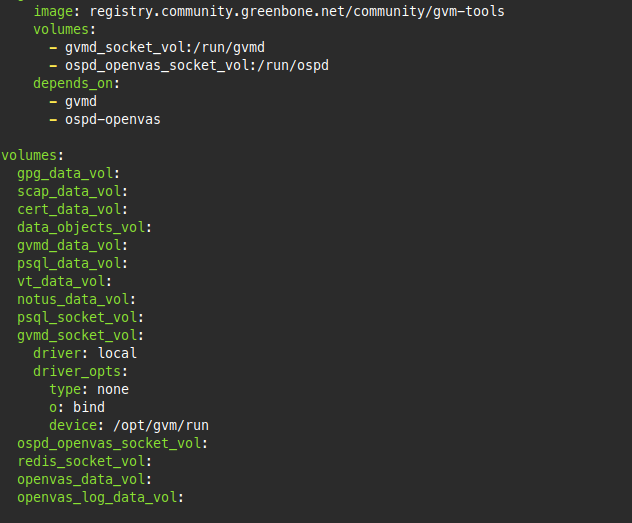
3. Modify the docker-compose.yml
Open docker-compose.yml and locate the volumes section at the bottom of the file.
You will see something similar to:
volumes:
  ...
  gvmd_socket_vol:
volumes:
  ...
  gvmd_socket_vol:
    driver: local
    driver_opts:
      type: none
      o: bind
      device: /opt/gvm/run
/opt/gvm/run on the host.
4. Start the Environment Again
After updating the configuration, start the stack:
docker compose -f docker-compose.yml up -d
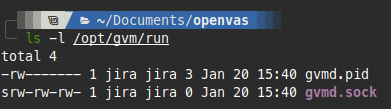
5. Configure the Executor
Once the containers are running, the gvmd socket will be available on the host at:
/opt/gvm/run/gvmd.sock
gvmd.
6. Python Dependency
Make sure the Python client library is up to date:
pip install -U python-gvm
python-gvm==26.9.0
Notes
- The
socketconnection type is fastest and recommended when the dispatcher runs on the same host as GVM - For remote connections,
sshortlsare required - TLS parameters are only used when
CONNECTION_TYPEistls